Key
Murder Mystery 2
Murder Mystery 2 (MM2) The #1 free script lots of features!
Main, Miscellaneous, Local Player, Troll
Southwest Florida Beta forgeuzi Jul 9 22 views
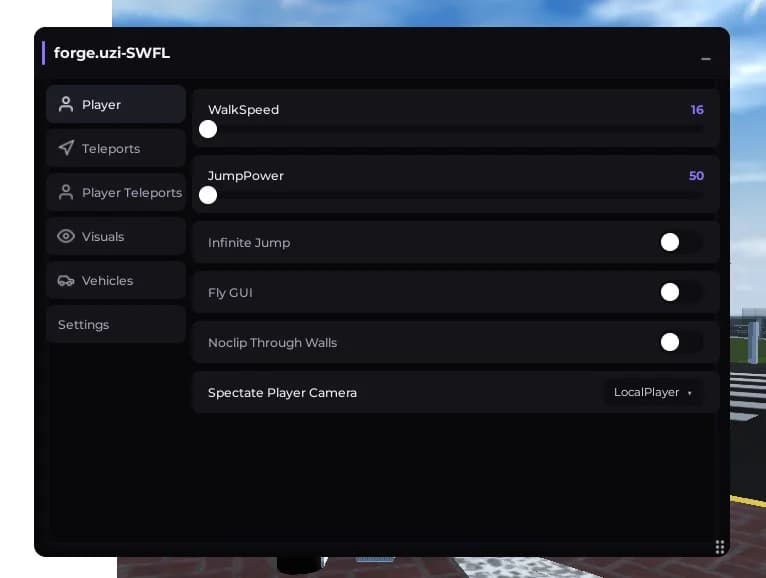
Forge.uzi - SWFL Modification Menu
A clean, dark-themed graphical user interface (GUI) designed for enhancing gameplay features in SWFL. This menu provides an organized layout with easily adjustable toggles and sliders divided into dedicated categories for streamlined navigation.
Features Included:
Player Customization: * WalkSpeed Slider: Allows real-time modification of the character's movement speed (Default: 16).
JumpPower Slider: Adjusts the jump height velocity of the character (Default: 50).
Infinite Jump: Toggle to allow continuous jumping in mid-air.
Fly GUI: Toggles a flight interface or mechanism for free map navigation.
Noclip Through Walls: Allows the character to pass directly through solid objects and environmental barriers.
Camera & Spectating:
Spectate Player Camera: A dropdown menu selector to switch the camera view between the local player and other players in the server.
Menu Navigation
The sidebar contains multiple dedicated tabs for full control over different aspects of the game:
Player (Active View)
Teleports
Player Teleports
Visuals
Vehicles
Settings
Note: There are more features available within the other tabs.
Press Get Script to open the loadstring right away.
Copy the loadstring from the page that opens.
Join Southwest Florida Beta on Roblox, paste the loadstring into your executor and run it.
Murder Mystery 2
Main, Miscellaneous, Local Player, Troll
Murder Mystery 2
Auto Farm, ESP, Fly, Fullbright +6 more