RBXSCRIPTS

Scripts

HOW TO FIX VERSION MISMATCH ROBLOX EXPLOIT ERROR

FREE · 13 views · Jun 18 · unknown

Get Script

Script code is hidden until you finish Lockr.

Description

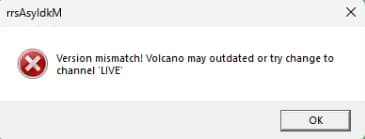
Firstly, you need to go to the link below, which will tell you the current channel of your currently signed-in Roblox account. If you're on the "LIVE" channel, then that means your exploit is outdated, OR you need to redownload it. If your account doesn't say "LIVE" then follow the next steps. Next you will need to download a modified patch for Bloxstrap, which is what will put your version of Roblox back onto "LIVE". After downloading this, you will need to install it. If you followed the previous steps, it will pop up saying the below: Once complete, it will display a message saying this: For good measure, it's always best to launch the Bloxstrap.exe one last time and launch from inside the UI, as this will ensure the "LIVE" channel will always be forced when launching into games directly from the Roblox website. Now you're good to go. Enjoy using your exploits without any issues.

Related

free

HOW TO DOWNGRADE YOUR ROBLOX AND EXECUTE SCRIPTS AGAIN AFTER UPDATES!

Roblox updates once a week for those that don't already know. When this weekly update happens it will break every single executor as they also need to update (Which can take a few hours on average). If you can't wait then follow the below steps to downgrade your Roblox version and execute scripts again. Firstly download Bloxstrap from the below link. Then you must install Bloxstrap. Head over to the link below. You will need to find out what the previous version of Roblox was and to do this I suggest you join the below discord. At the time of writing this guide the previous roblox version is: version-d6abc3b106a04c5c so we need to copy the "d6abc3b106a04c5c" part. Copy the number part into the "Version Hash" box on the RDD website. Press "download" and this will download the old build of Roblox. Go to the below link and make sure you're on the LIVE channel. If you aren't on the live channel then CLICK HERE to follow the guide on how to get live channel. Go to your search bar and type %localappdata% then go to the "Bloxstrap" folder and go to "Versions". Here you will be able to find your Roblox versions that bloxstrap will use whenever you play Roblox. You need to open up the downgraded Roblox folder and copy everything into your Bloxstrap Roblox folder. You can now launch into Roblox from the web version and execute scripts again. THIS WILL NOT WORK FOREVER! Roblox will cut the connection to the previous builds after some time so enjoy executing scripts while you can. This guide is for anyone that really wants to keep executing for a short time after Roblox pushes an update.

Roblox70 · Jun 5
free

Brainrot Police 🚓🚓

# whoop whoop cuz its the brainrot police 🚓🚓🚓 To suggest games, report bugs, etc. Join https://discord.gg/vaehz This is an open source little project I made for a bunch of shitty brainrot games. Don't take it too serious lads

Universal15K · Jun 3
free

hectic sell lemons autofarm

if u wanna see the development of this script check out the video linked may not work on mobile, haven't tested, not sure

Sell Lemons 🍋8.6K · Jun 14
free

ULTIMATE SAVE INSTANCE SCRIPT COLLECTION

I've listed here 3 of the best universal syn save instance scripts that you can get. They all work great and have many cool options you can toggle and mess with from the documentation. Credits go to the respective authors.

Universal4K · 6d ago
free

HOW TO BYPASS ROBLOX BANNING API AND ALT ACCOUNT DETECTION!

In today's article, I will be giving you step-by-step instructions on how to get around the new Roblox banning API and alt account detection system. Remember that this will not UNBAN any of the banned accounts caught by the banning API, but it will allow you to join the game again on a fresh account without being instantly banned. Whichever browser your on or whatever method you prefer you need to delete your Roblox cookies. Once you've deleted all your cookies refresh the page and you'll be signed out. Now you can move onto the next step. Next, you want to go to your Windows search bar and search for "%localappdata%", then press enter and load up the folder. Once you've loaded the folder up, you need to find and delete the "Roblox" folder. (If you use bloxstrap or fishstrap, then you'll need to delete these folders as well) After deleting the folder(s) you can now move onto the final step. This is the final step. Go to the below website and download the TMAC Spoofer: Once downloaded, launch it and it will look something like this: Click on "Change Now" and make sure you've selected the correct network connection (You can tell the correct one easily by checking the "link status" and seeing if it says "Up, Operational")

Roblox274 · Sep 12
free

Velocity UI Remake

## I DO NOT RECOMMEND USING THIS SERIOUSLY. This is just a fun project I made, It **will** have bugs, I **will NOT** fix them. I don't plan on ever updating this.

Universal2.3K · Jul 15