RBXSCRIPTS

Scripts · TTK Testing [HARDPOINT]

TTK Testing Script - ESP, Silent Aim, Aimbot, Triggerbot & Recoil Control | Open Source, No Key | Updated 31.08.2026

FREE · 35 views · 20d ago · Seltonmt

Get Script

Script code is hidden until you finish Lockr.

Description

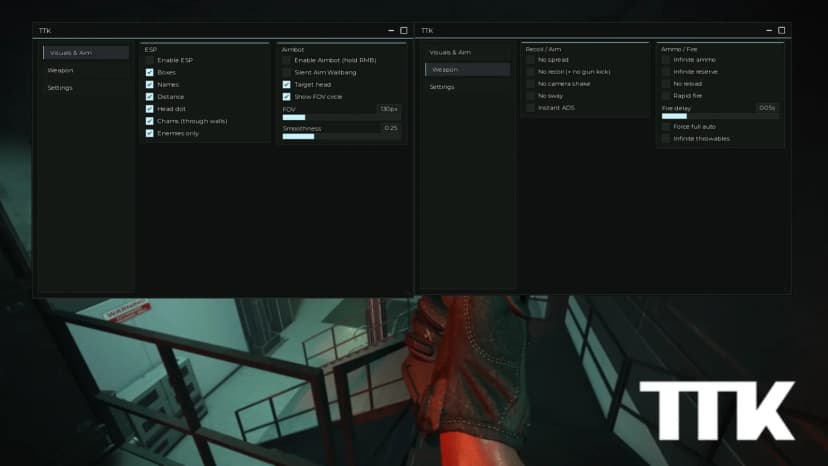
ESP and aim tools for TTK Testing. Open the panel, switch on what you want, and you can see every enemy through the map - including the thing every other script for this game gets wrong. FEATURES ESP that tracks the REAL body. The character you see here is a decoy; the actual hitboxes live in a separate rig, and scripts that read the visible character are aiming at the wrong one Box, name, team, weapon in hand, distance, health, kills and deaths, head marker, skeleton, and the real hitboxes drawn Knows alive from ragdolled from dead - a downed body still carries a full set of hitboxes Wall check uses the game's own collision group, so the invisible map barriers never count as cover Chams, magazine bar, custom crosshair Aim assist on the head, because every firearm here one-shots to the head and needs three body hits Separate H and V smoothing, framerate independent, sticky target, visible only Triggerbot with random reaction delay, hit chance, refire lockout, head only Recoil control that measures your own sensitivity instead of asking you to calibrate Humanisation: turn rate cap in degrees per second, reaction spread, wind up, break off, dead zone Round page with the full scoreboard ABOUT THE ANTICHEAT This game ships one. It does not kick and it does not ban - it reports. The script was built around it: no metamethod hooks, no FireServer hooks, no recoil values written, no body movers. A page in the panel lists all of it so you can check rather than take our word. There is deliberately no silent aim, because whether the server would accept one was never measured. MOBILE Works on mobile executors. The panel asks PC or phone on first run and scales itself, in four languages. HOW TO RUN 1. Copy the script below 2. Execute it in your executor 3. Press RightShift for the panel No key, no ads, never spends Robux. https://github.com/seltonmt012/sel01-rbx/blob/main/games/ttk.lua

Supported games

TTK Testing [HARDPOINT]

Features

Related

free

Counter Blox Script - ESP, Aimbot, Triggerbot, Chams and Recoil Control | Free, No Key, Open Source

ESP and aim tools for Counter Blox. Open the panel, switch on what you want, and you can see every enemy through the map, what they are holding and how much money their team has. **Features** - ESP: box, name, health bar, weapon in hand, distance, head marker and full R15 skeleton - Chams in seven styles, two of which light enemies up only while they are behind cover - Colour picker for enemies, team, chams and the FOV circle - Aim assist with separate horizontal and vertical smoothing, sticky target, FOV circle, visible-only, plus its own settings for the first bullet and the rest of the spray - Triggerbot with random reaction delay, hit chance, refire lockout, burst limit and head-only mode - Recoil control that measures your own mouse sensitivity, no setup - Round panel: who is alive, who carries the bomb, and every player's weapon, distance and cash **Mobile** Works on mobile executors. The panel asks PC or phone on first run and scales itself. **How to run** 1. Copy the script 2. Execute it in your executor 3. Press RightShift for the panel 4. Only the ESP is on by default, switch on the rest as you like No key, no ads, and it never spends Robux. The aim assist only moves your camera and the triggerbot presses your real mouse button, so nothing fakes a hit. Open source: https://github.com/seltonmt012/sel01-rbx/blob/main/games/counterblox.lua Discord: https://discord.gg/ARdpzFuKMm Tested on Potassium (Windows).

Counter Blox28 · 24d ago
free

Deagle Arena Script - ESP, Aim Assist, Triggerbot, Silent Aim & Bot Detection | Open Source, No Key

ESP and aim tools for Deagle Arena. Open the panel, switch on what you want, and you can see every opponent through the map, including the one thing this game hides from you completely. FEATURES Bot detection - this game fills your lobby with bots that carry real usernames and real avatars, and nothing on screen tells you. Every one of them is marked [BOT] ESP - box, name, level or elo, distance, kill streak, head marker and skeleton Spawn protection marker - shooting a protected player only costs you your own 1.1 second cooldown Real hitboxes - draws the actual BodyHitbox and HeadHitbox, both far larger than the model Cooldown bar - a hit costs 0.9s and a miss 1.1s, and the game never shows you that number Aim assist - camera only, separate horizontal and vertical smoothing, framerate independent, aimed at the body because damage is a flat 100 either way Triggerbot - reads the gun's own cooldown so it never clicks into a reload, random reaction delay, hit chance, refire lockout Silent aim - optional, with its own FOV circle, off by default and in no preset Chams in seven styles, custom colours for bots and real players Humanisation - turn rate cap in degrees per second, reaction spread, wind up, break off, aim drift, dead zone Round panel - who is alive, who is a bot, your elo, rank and streak MOBILE Works on mobile executors. The panel asks PC or phone on first run and scales itself, in four languages. HOW TO RUN 1. Copy the script below 2. Execute it in your executor 3. Press RightShift for the panel 4. Only the ESP is on by default, switch on the rest as you like No key, no ads, and it never spends Robux. The aim assist only moves your camera and the triggerbot presses your real mouse button. Open source, read it before you run it: https://github.com/seltonmt012/sel01-rbx/blob/main/games/deaglearena.lua Tested on Potassium (Windows). Panel: RightShift.

Deagle Arena12 · 20d ago
free

Arsenal Script - ESP with Level and Weapon, Chams, Aim Assist, Triggerbot, Recoil Control & Humanisation | Mobile Friendly, Open Source, No Key

ESP and aim tools for Arsenal. Open the panel, switch on what you want, and you can see every enemy through the map - and how close each one is to winning. FEATURES ESP - box, name, health, distance, head marker and full skeleton Level and weapon - in a gun game the level IS the weapon, so the box shows both Leader marker - whoever is nearest the last level gets his own colour Kills and killstreak per player, plus arrows for anyone behind you Chams - seven styles, two of them only light enemies up behind cover Aim assist - camera only, separate horizontal and vertical smoothing, framerate independent, own settings for the first bullet and the rest of the spray Triggerbot - random reaction delay, hit chance, refire lockout, burst limit, head only Recoil control - measures your own sensitivity, no setup Humanisation page - reaction time, target switch lockout, ramp up, aim drift, overshoot, dead zone, a turn rate limit in degrees per second, and three presets MOBILE Works on mobile executors. The panel asks PC or phone on first run and scales itself, in four languages. A hotkey your device cannot press falls back to holding the screen by itself, and there is a Screen held mode next to Hotkey and Always. HOW TO RUN 1. Copy the script below 2. Execute it in your executor 3. Press RightShift for the panel 4. Only the ESP is on by default, switch on the rest as you like No key, no ads, and it never spends Robux. The aim assist only moves your camera and the triggerbot presses your real mouse button, so nothing fakes a hit. Open source, read it before you run it: https://github.com/seltonmt012/sel01-rbx/blob/main/games/arsenal.lua Tested on Potassium (Windows). Panel: RightShift.

Arsenal33 · 7d ago
key · key

BloxStrike Script - ESP, Silent Aim, Aimbot, Triggerbot & Recoil Control | Key System, Free 4h Key | Updated 06.09.2026

**Updated 28.08.2026** - silent aim added, aim assist and recoil control fixed, now a free 4h key system. ESP and aim tools for **BloxStrike**. Open the panel, switch on what you want, and you see every enemy through the map - including things the game itself never shows you. ## Features - **ESP** - box, name, health, distance, head marker and full skeleton - **Live weapon** - the gun actually in their hands, marked while they are scoped or crouched - **Ammo** - how many rounds are left in an enemy magazine, not just your own - **Armour and money** - + for kevlar, ! for kevlar and helmet, K for a defuse kit - **Aiming at you** - highlights any enemy whose crosshair is on you, before he fires - **Chams** - seven styles, two of them only light enemies up behind cover - **Silent aim** - you shoot as normal and the bullet goes to the head. Nothing fires by itself, your own shot is redirected. Own page, off by default, with a test mode that changes nothing - **Aim assist** - camera only, separate horizontal and vertical smoothing, framerate independent, own settings for the first bullet and the rest of the spray - **Triggerbot** - random reaction delay, hit chance, refire lockout, burst limit, head only - **Recoil control** - the game's own spray pattern, or it measures your sensitivity itself - **Humanisation page** - reaction time, target switch lockout, aim drift, overshoot, dead zone and a turn rate cap in degrees per second - **Round panel** - score, timer, bomb state, who is alive, the enemy economy ## Key system Free key, valid 4 hours. Load the script, press the button in the panel, complete the short link and paste the key back in. One key unlocks every protected Selux script. ## Mobile Works on mobile executors. The panel asks PC or phone on the first run and scales itself, in four languages. ## How to run 1. Copy the loader below 2. Execute it while you are in BloxStrike 3. Press the key button in the panel and paste your free key

BloxStrike24 · 17d ago
free

TTK Testing | OPEN SOURCE

Cool little script for TTK Testing completely open source using sirmemes vibeui as ui. [UI Library](https://sirmemegithub.com/RealSlimShady2000/VibeUI) Please skid off me so you can make some money🙏

TTK Testing [HARDPOINT]23 · 22d ago
free

Counter Blox Script - ESP, Chams, Aimbot, Triggerbot, Recoil Control & Spray Pattern | Mobile Friendly, Open Source, No Key

ESP and aim tools for Counter Blox. Open the panel, switch on what you want, and you can see every enemy through the map, what they are holding and how much money their team has. FEATURES ESP - box, name, health bar, weapon in hand, distance, head marker and full R15 skeleton Chams - seven styles, two of them light enemies up only while they are behind cover Colours - pick your own for enemies, team, chams and the FOV circle Aim assist - separate horizontal and vertical smoothing, sticky target, FOV circle, visible-only, and its own settings for the first bullet and for the rest of the spray Triggerbot - random reaction delay, hit chance, refire lockout, burst limit, head only Recoil control - two sources you can mix. It measures your own mouse sensitivity with no setup, and it reads the weapon's real CS spray table straight out of the game, which is where the sideways half of a spray comes from Visuals - a static crosshair that does not open up with the spread, the spray curve drawn over your screen and lit up to the shot you are on, a field of view slider, and a big bomb countdown once the C4 is armed Humanise - reaction delay, target switch lock, wind up, aim offset, hand noise, overshoot, deadzone, a turn speed cap, break offs and trigger fatigue, with LEGIT, NORMAL and RAW presets and a panic key Round panel - who is alive, who carries the bomb, and every player's weapon, distance and cash MOBILE Works on mobile executors. The panel asks PC or phone on first run and scales itself. A hotkey your device cannot press falls back to holding the screen by itself, and there is a Screen held mode next to Hotkey and Always. HOW TO RUN 1. Copy the script below 2. Execute it in your executor 3. Press RightShift for the panel 4. Only the ESP is on by default, switch on the rest as you like No key, no ads, and it never spends Robux. The aim assist only moves your camera and the triggerbot presses your real mouse button, so nothing fakes a hit. Open source, read it befo

Counter Blox15 · 7d ago